

Polkadot-JS Identity Guides
This is an advanced guide that is relevant for entities that would like to become registrars or would like to set sub-identities to an existing account with an identity. See this page to learn about how to set an identity and have it verified.
Setting an Identity
Section titled “Setting an Identity”Users can set an identity by registering through default fields such as legal name, display name, website, Twitter handle, Riot handle, etc. along with some extra, custom fields for which they would like attestations (see Judgements).
Format Caveat
Section titled “Format Caveat”Please note the following caveat: because the fields support different formats, from raw bytes to various hashes, a UI has no way of telling how to encode a given field it encounters. The Polkadot Developer Interface currently encodes the raw bytes it encounters as UTF8 strings, which makes these values readable on-screen. However, given that there are no restrictions on the values that can be placed into these fields, a different UI may interpret them as, for example, IPFS hashes or encoded bitmaps. This means any field stored as raw bytes will become unreadable by that specific UI. As field standards crystallize, things will become easier to use but for now, every custom implementation of displaying user information will likely have to make a conscious decision on the approach to take, or support multiple formats and then attempt multiple encodings until the output makes sense.
Request Judgement
Section titled “Request Judgement”To be judged after submitting your identity information, go to the
Extrinsics tab in the Polkadot Developer Interface and select the
identity pallet, then requestJudgement. For the reg_index put the index of the registrar you
want to be judged by, and for the max_fee put the maximum you're willing to pay for these
confirmations.
If you don't know which registrar to pick, first check the available registrars by going to
Chain State tab in the Polkadot Developer Interface and selecting
identity.registrars() to get the full list.
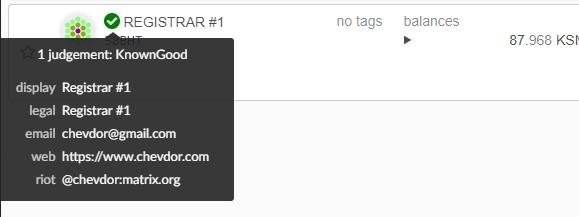
To find out how to contact the registrar after the application for judgement or to learn who they are, you can check their identity by adding them to your Address Book. Their identity will be automatically loaded.
Clearing and Killing an Identity
Section titled “Clearing and Killing an Identity”Clearing: Users can clear their identity information and have their deposit returned. Clearing an identity also clears all sub accounts and returns their deposits.
Killing: It is possible to kill an identity that deems erroneous. This results in a slash of the deposit.
Setting Sub-Identities
Section titled “Setting Sub-Identities”To set up sub-identities with Polkadot-JS see the how to set sub-identities article and this video tutorial.
Setting Sub-Identity (Sub-ID) for your Ledger Account
Section titled “Setting Sub-Identity (Sub-ID) for your Ledger Account”Setting an Identity is not possible on Ledger app yet, but as a workaround, you can set the identity for an on-chain account and then use it to set a sub-identity to your Ledger account.
-
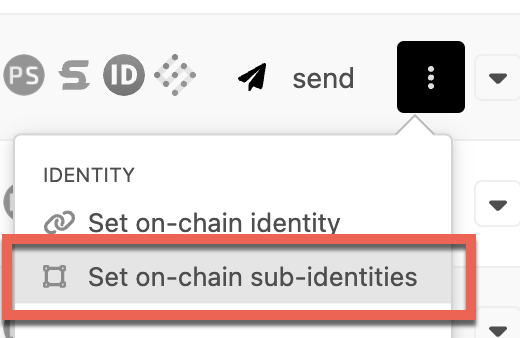
Go to https://polkadot.js.org/apps/#/accounts. Click on the three vertical dots corresponding to the account to which you already set identity. You should see an option to set onchain sub-identities. Click on it.
-
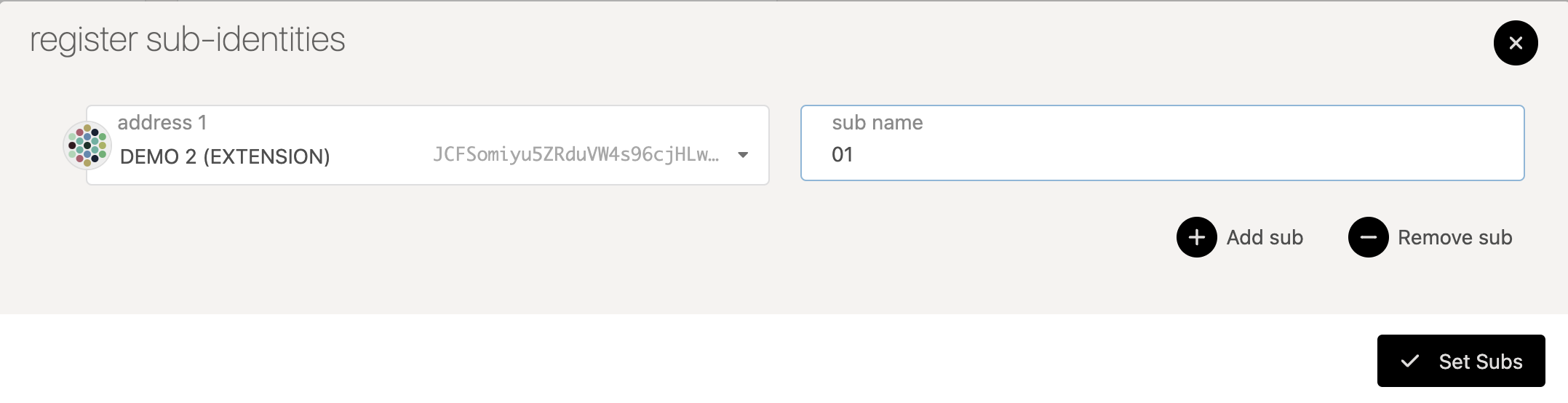
In the pop-up window, select your Ledger account from the dropdown and enter text in sub name field. Then, click on set subs button.
-
Sign and submit the transaction from the parent account with the identity
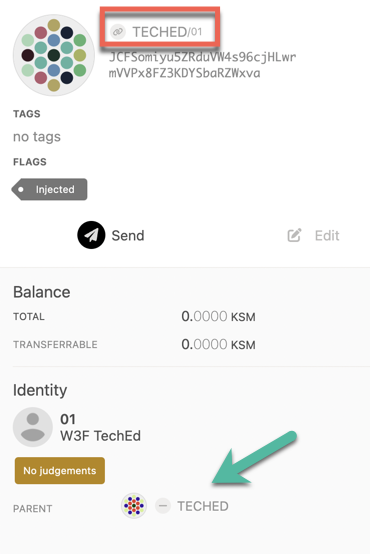
You should now see the sub-identity displayed on-chain. You need to be aware that the creation of identities and sub-identities requires deposits. This reserved account balance is freed once you clear the identities on the account.
Registrars
Section titled “Registrars”Becoming a Registrar
Section titled “Becoming a Registrar”To become a registrar, submit a pre-image and proposal on OpenGov, then wait for people to vote on it. For best results, write a post about your identity and intentions beforehand, and once the proposal is in the queue ask people to endorse it so that it gets ahead in the referendum queue.