

How to Teleport DOT or KSM
There are a few reasons why you might want to teleport your DOT from Polkadot Asset Hub to other system chains, for example:
- You want to set your on-chain identity on Polkadot People or Kusama People.
- You want to access the coretime market.
Transaction fees
Section titled “Transaction fees”There are two types of fees that are imposed when teleporting your DOT or KSM, and they are deducted differently.
Transaction fees on the source chain
Section titled “Transaction fees on the source chain”Like with regular transfers, these fees are deducted from your transferable balance.
Transaction fees on the destination chain
Section titled “Transaction fees on the destination chain”Teleports come with an additional fee on the destination chain. This fee is deducted from the teleported amount of DOT or KSM. The remainder needs to be greater than the existential deposit of the destination chain. Otherwise, the entire balance you teleported will be lost.
How to teleport your assets between chains
Section titled “How to teleport your assets between chains”1. Make sure to switch to the source chain.
2. On top of the page, navigate to "Accounts" > "Teleport":
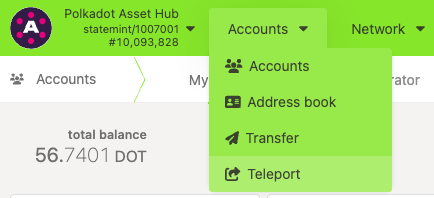
3. This opens the "Teleport assets" interface:
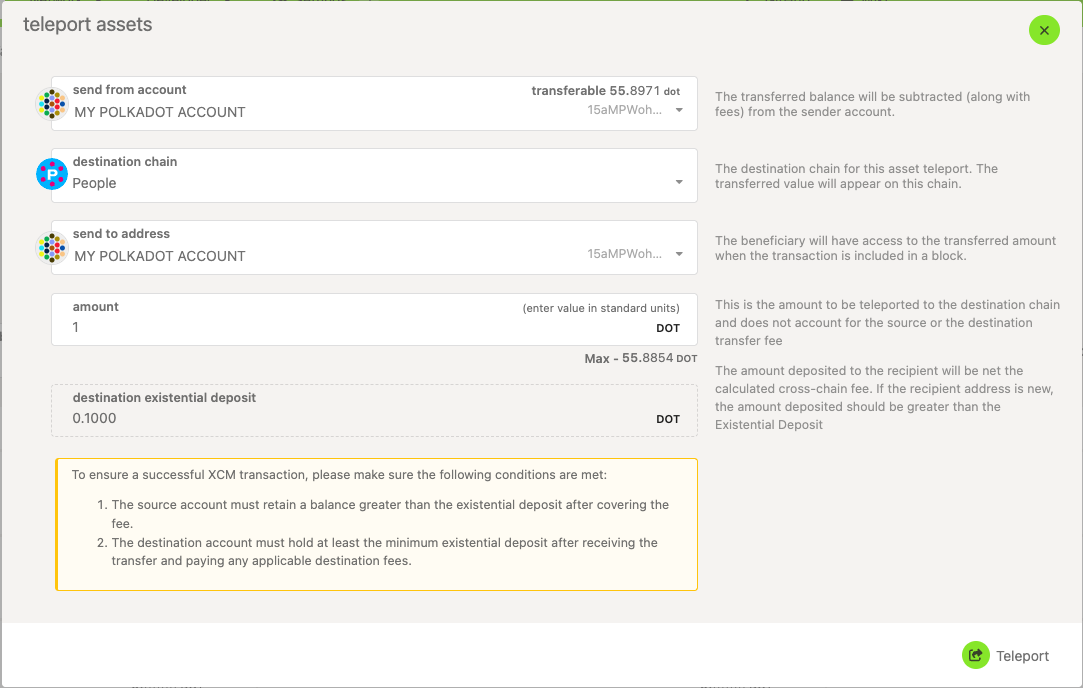
Here, you can choose:
- Send from account : choose your account with the source token.
- Destination chain : choose the network to send the assets to.
- Send to address : choose or paste the account receiving the funds on the destination chain.
- Amount : enter the amount you wish to teleport. This amount doesn't include the transfer fee on the source chain, but the fee on the destination chain will be deducted from it.
4. After reviewing transaction information and fees, click the "Teleport" button, then sign and submit your transaction.
If you are more of a visual type, this video tutorial guides you through the teleport process:
Teleporting | Technical Explainers