

How Do I Stake (Nominate) on Polkadot?
Nominators help secure the network by bonding their DOT and selecting validators they deem trustworthy to produce blocks. If you want to learn more about the benefits and risks of being a nominator, you can check this article.
What to know before starting
Section titled “What to know before starting”- Nominating currently requires a minimum of 250 DOT staked funds on Polkadot(0.1 KSM on Kusama). Please ensure you're above that minimum, or you won't be able to nominate.
- If you are staking above the dynamic minimum amount and still aren't receiving rewards , it's possible that your account needs to be re-adjusted by calling an extrinsic. This is due to the new bags-list feature. You can find instructions on how to fix this here.
- If you don't have enough DOT to earn rewards, consider joining a nomination pool instead of staking solo.
How to stake using the Polkadot Developer Interface
Section titled “How to stake using the Polkadot Developer Interface”You can nominate validators (also known as "staking") on Polkadot Developer Interface using these steps:
1. Create a Polkadot account if you don't have one yet:
How to Create a Polkadot Account
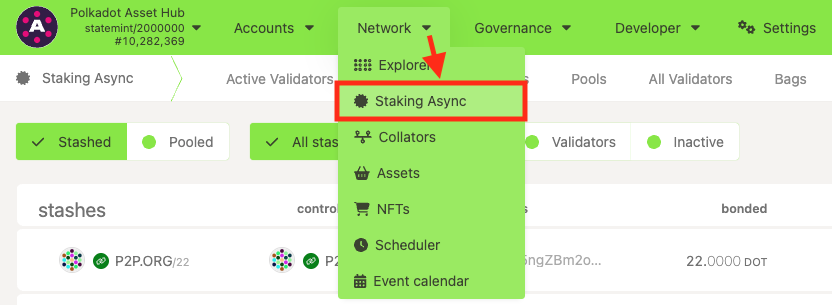
2. "Navigate to Network" > "Staking Async" > "Accounts" page on Polkadot Developer Interface:
3. Click on the "+ Nominator" button on the top right.
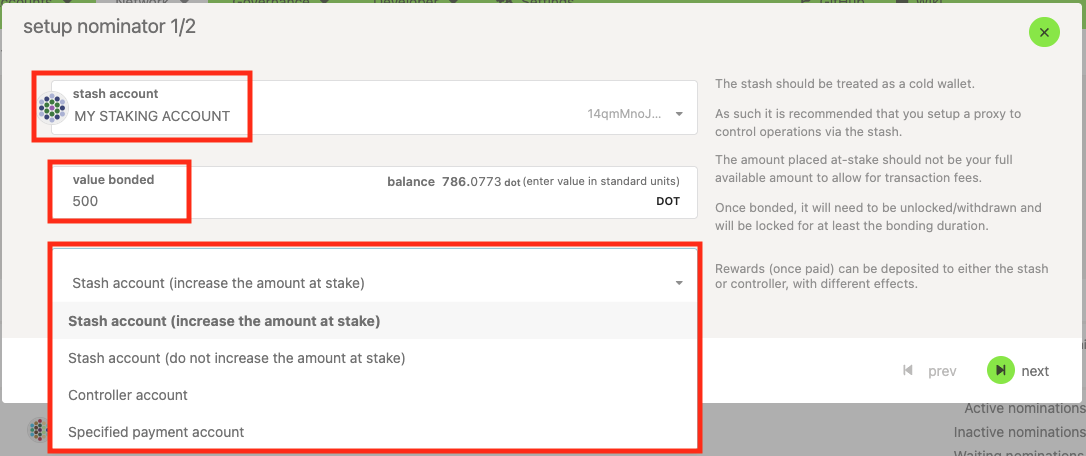
4. Choose your Stash account from the drop-down menu.
5. Select the amount you want to bond. Make sure you leave a small amount of DOT transferrable in both the stash and the staking proxy. You'll need some transferrable funds to pay transaction fees when changing your nominations, bonding more, or unbonding.
6. Choose your reward destination. You can auto-compound your staking rewards (increasing the amount at stake), send them to your stash account as free balance, or send them to any other account.
7. Click "Next." Now, you need to select your validators. Please ensure you've read the article on choosing your validators. You can nominate up to 16 validators on both Polkadot and Kusama. Nominating more trustworthy validators increases your chance to earn rewards consistently.
8. Once you're done, click "Bond & Nominate." Review the transaction and click "Sign and submit" to finish the process.
That's it. You'll begin earning rewards after the next era or the era after that, depending on the timing of your nominations.