This is the full developer documentation for Polkadot Developers
# Apps
> Build Polkadot Products, sandboxed apps that run inside the Polkadot Hosts, addressed by .dot domain names, and signed by the user's phone.
## Get the Polkadot App
The Polkadot App is your wallet, identity, and signer: the center of everything you build. Install it first; every path below connects through it.
[App Store — Coming soon]() [Android (APK)](https://github.com/paritytech/trinity-user-agents/releases/tag/nightly-android)
The Android build is a nightly APK published by Parity, so you install it from the release page rather than from Google Play. The release offers two APKs:
* **`app-gp-nightly.apk`**: For devices with Google Play services.
* **`app-vanilla-nightly.apk`**: For devices without Google Play services.
Android blocks APKs from outside an app store by default. When prompted, allow the app you downloaded the APK with, such as your browser or file manager, to install unknown apps, then open the APK to install it.
Products Devnet
PCF publishes separate app builds for the Products Devnet (`devnet` preset): see [More resources](/apps/reference/resources/).
## Then Pick Your Path
* **Deploy Your First Product**
***
Go from nothing to a live `.dot` Product: generate one in the browser with RevX, or deploy from the terminal with the CLI. No local host setup to reach a live deployment.
[→ Quick Start](/apps/quick-start/)
* **Develop Locally (the Full Route)**
***
Install Polkadot Desktop, pair it with your phone, and get TestNet tokens, then build your Product capability by capability.
[→ Get Started](/apps/get-started/)
## What Is a Polkadot Product?
*Polkadot Products* are what *you* build: third-party applications that run *inside* one of the Polkadot Apps. Products are sandboxed single-page apps (HTML / JS / CSS), addressed by `.dot` names (e.g., `awesome.dot`), registered on-chain through a decentralized name service, and they never see the user's private key. The bundle itself is published to a decentralized cloud storage provider and fetched by the Host on demand.
*Polkadot Apps* are the three applications that can host Polkadot Products, collectively known as the *Polkadot Triangle*:
* **[Polkadot Desktop](/reference/apps/hosts/polkadot-desktop/)**: The workstation host. Loads Polkadot Products by their `.dot` name and runs them in a sandbox.
* **[Polkadot App](/reference/apps/hosts/polkadot-app/)**: The mobile wallet and signer. Holds the user's private key and approves every signing request.
* **[Polkadot Web](/reference/apps/hosts/polkadot-web/)**: The browser host at `dot.li`. Resolves `.dot` names client-side via a light client and renders the Product in a sandboxed iframe.
You build Polkadot Products. They run inside one of the Polkadot Apps. This section teaches you how.
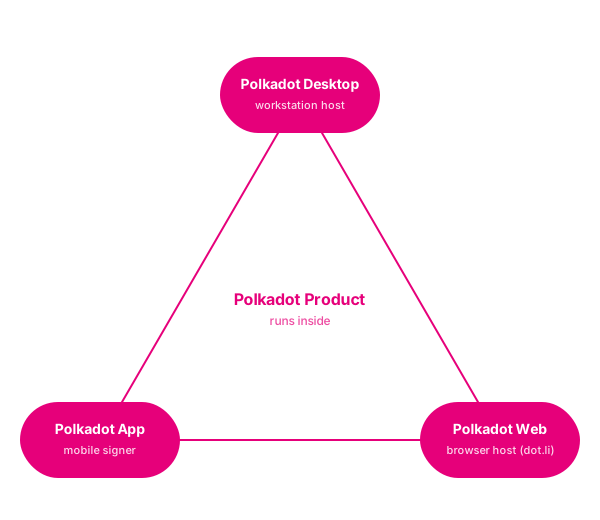
For the architectural breakdown covering how the Product, SDK, Host, and Polkadot infrastructure relate, see the [App Development Reference](/reference/apps/).
## Why Build a Polkadot Product?
Polkadot Apps is a complete environment for building Web3 decentralized applications:
**Wallet built-in**: The Polkadot App on the user's phone is the wallet for every Polkadot Product they use. No wallet integration code, no "Connect Wallet" button to design, no signing plumbing to maintain. Your Product receives a derived per-user account and asks for signatures; approvals happen on the user's phone.
**Identity built-in**: Per-Product accounts are derived from the user's `.dot` identity, so there is no signup flow. With [Proof of Personhood](/reference/apps/infrastructure/pop/), you can gate features on verified-human status without seeing who the user is, a privacy-preserving humans-only access model built into the platform. Need to recognize the same user across two of your Products? Same alias system, scoped to your Product set.
**Decentralized hosting**: Your bundle lives on a decentralized cloud storage provider. Your `.dot` name lives in a decentralized name service. There is no centralized hosting provider, no DNS service, no platform in the middle. Users fetch your Product directly and verify it themselves.
**Product SDK**: The [Product SDK](/apps/product-sdk/) covers what you would otherwise integrate yourself:
* **Chain access**: Query state and submit transactions through the Host. No RPC servers to operate; signing prompts open on the user's phone.
* **Decentralized storage**: Upload files, get a permanent content-addressed URL.
* **Real-time signed messaging**: Pub/sub between users of your Product via the [Statement Store](/reference/apps/infrastructure/statement-store/), every message verifiable.
* **Smart contracts**: Call `pallet-revive` contracts on Asset Hub, resolved by name and typed from a manifest (deployed with the Contract Dependency Manager).
* **Privacy-preserving payments**: Request, top up, track status. Built on [Coinage](/reference/apps/infrastructure/pop/pallet-coinage/).
* **Chat**: Rooms, bots, interactive action buttons.
* **Identity**: Derived per-Product accounts, plus optional [Proof of Personhood](/reference/apps/infrastructure/pop/) gating.
* **Local storage**: Per-Product key/value, persisted on the user's device.
Permissions (microphone access, outbound network requests, on-chain transaction submission, and more) are declared in your Product's [manifest](/reference/apps/hosts/polkadot-desktop/permissions/) and prompted at runtime. Users see exactly what your Product can access before they grant it. The Host enforces the boundary inside its [sandbox](/reference/apps/protocol/truapi/sandbox/), not your code.
**Three Hosts, one Product**: The same `.dot` bundle runs in the mobile Polkadot App, on the workstation in Polkadot Desktop, and in any browser via Polkadot Web. You do not write three apps; the Triangle abstracts the platform.
# Architecture overview
On the Polkadot Products Devnet, web apps are named, published and opened through Polkadot infrastructure. People open them in the Polkadot app or through the web gateway at [dev-dot.li](https://dev-dot.li). Either way, the app runs on the user's device in a sandboxed container.
This page follows one request, a user opening a `.dot` app, from the name to chain storage and back. Each subsystem has its own page with the details.
## The pieces
* The network: a community-operated [Paseo](/apps/architecture/network/) relay chain plus system parachains. App developers target Asset Hub (para 1000), which runs `pallet-revive` (PolkaVM/EVM contracts, chain id `420420417`), the `pallet-assets` suite and the DotNS gateway pallet. Identity lives on the People chain (para 1004). Web-app bundles live on the Bulletin chain (para 1010).
* The client tier: three native [Polkadot app](/apps/architecture/client/) clients (Android, iOS, Desktop/Web). They hold keys on the device and host dApps in a sandboxed webview, talking to them over a shared protocol, TrUAPI.
* Naming: [DotNS](/apps/architecture/naming/), a set of PolkaVM contracts that turn a `.dot` domain into an owner, a resolver and a content hash.
* App delivery: the [`pad` CLI](/apps/architecture/app-delivery/) uploads a static bundle to Bulletin and binds its CID to a `.dot` domain. The [dotli gateway](/apps/architecture/app-delivery/) resolves and renders it.
* Storage & data: one content-addressed [Bulletin store](/apps/architecture/storage/) holds both app bundles and app runtime data (through Cloud Storage). Writes need an authorization, and reads are open.
* Smart contracts: [contracts](/apps/architecture/contracts/) are PolkaVM bytecode running on `pallet-revive` on Asset Hub.
* Identity & personhood: [proof-of-personhood](/apps/architecture/identity/) tiers (Lite and Full) and a precompile any contract can read.
* Money: [CASH](/apps/architecture/money/), a devnet "digital dollar" spent through the privacy-preserving Coinage system on the People chain.
* Discovery: [Browse](/apps/architecture/discovery/), an on-chain publisher registry of listable apps.
* Messaging: [chat and calls](/apps/architecture/messaging/) carried over the People-chain statement store, with media on Bulletin and WebRTC for calls.
## System diagram
```
flowchart TD
subgraph Clients["Entry points"]
APP["Polkadot app (Android / iOS / Desktop)"]
GW["Web gateway dev-dot.li"]
end
subgraph Dev["Developer tooling (npm)"]
SDK["@parity/product-sdk"]
PAD["polkadot-app-deploy (pad)"]
DOTNS["@polkadot-community-foundation/dotns-cli"]
end
subgraph Net["Devnet"]
AH["Asset Hub (1000) pallet-revive + assets DotNS contracts"]
PEOPLE["People (1004) identity + personhood Coinage + statement store"]
BULLETIN["Bulletin (1010) app bundles + chat media"]
end
APP -->|TrUAPI| SDK
GW -->|smoldot light client| AH
SDK -->|host-routed RPC| AH
SDK --> PEOPLE
SDK --> BULLETIN
PAD -->|upload bundle| BULLETIN
PAD -->|register name + contenthash| AH
DOTNS -->|reserve .dot| AH
AH -.->|contenthash = CID| BULLETIN
PEOPLE -.->|ring roots via XCM| AH
```
## Request path: opening a `.dot` app
Take a user opening `calculator.dot`. The steps are much the same on the web gateway and in the app's browser. What differs is who you have to trust.
1. Address to label. On the web, the user visits `https://calculator.dev-dot.li`, and the dotli host takes the registrable root and the label `calculator` from the subdomain. In the app, the user types `calculator.dot` into the browser bar.
2. Name to content hash. The client computes the ENS-style namehash of `calculator.dot` (`keccak256(DOT_NODE, keccak256("calculator"))`) and reads `contenthash(node)` from the DotNS ContentResolver contract on Asset Hub. The web gateway does this without trusting a server: it reads contract storage directly through an in-browser smoldot light client, so there is no RPC server in the path.
3. Content hash to CID. The `contenthash` bytes (`0xe301` + CIDv1) decode to an IPFS CID that points at the app bundle.
4. Fetch the bundle. The content comes from the Bulletin chain (through smoldot `bitswap_v1_get`, shown as verified) or from an IPFS gateway. A directory arrives as a CAR archive, which is parsed into a file map and served by a Service Worker virtual filesystem.
5. Render in a sandbox. The bundle runs inside a sandboxed iframe (web) or a platform webview (app). The host opens a TrUAPI channel to it. The gateway runs the TrUAPI core (`@parity/truapi-host`) in a Web Worker and hands the iframe a `MessagePort`, and the native apps run the same core. The Product's TrUAPI client (`@parity/truapi`, used by the Product SDK) talks over that channel.
6. App talks to the host. Over TrUAPI the dApp asks for accounts, permissions, signatures and chain connections. All chain RPC goes through the host container (the Product SDK is built to run inside it), so the app never manages its own node connections or keys. Keys on the device sign, and the user approves each signature in a native modal.
From here the running app draws on the rest of the platform: it calls [contracts](/apps/architecture/contracts/) on Asset Hub, reads a caller's [personhood tier](/apps/architecture/identity/) from the precompile at `0x…0a010000`, or moves [CASH](/apps/architecture/money/). Messaging and calls run over the same [People-chain statement store](/apps/architecture/messaging/) the app already uses.
## Where to go next
* New here? Start with [Get started as a developer](/apps/get-started/developers/).
* Building an app? Read [App delivery](/apps/architecture/app-delivery/), then [Build & publish an app](/apps/build/build-and-publish/).
* Looking for addresses and endpoints? See [Reference](/apps/reference/).
# App delivery
This page follows a built frontend on its way to becoming a live app on the Polkadot Products Devnet. You publish a static bundle with the `pad` CLI, the content is stored on the Bulletin chain, a `.dot` domain is bound to it, and people load it through the `dev-dot.li` gateway or the Polkadot app.
No server sits between a user and an app. The content lives on-chain (Bulletin), the pointer to it lives on-chain (a `.dot` domain resolver on Asset Hub), and the loader is a program on the user's device that reads both directly.
Paseo Next v2
This page covers the PCF Products Devnet (`devnet` preset). For Paseo Next v2 (`paseo` preset), see [Deploy Your App](/apps/deploy-your-app/).
## Publishing and opening
Delivery has a write side (publishing) and a read side (opening). The publisher uploads a bundle and binds a name to it once. Every visitor then resolves and fetches that bundle independently.
```
flowchart TD
A[Built static app] --> B[pad CLI prepares bundle]
B --> C[Upload content to Bulletin]
C --> D[Receive content CID]
D --> E{DotNS on Asset Hub}
E -->|not owned| G[register name]
E -->|owned| H[use existing name]
G --> I[write contenthash]
H --> I
I --> J[optional Browse listing]
J --> K[Live: name.dot in app + https://name.dev-dot.li]
```
## Publishing with `pad`
The deploy CLI is [`@polkadot-community-foundation/polkadot-app-deploy`](https://www.npmjs.com/package/@polkadot-community-foundation/polkadot-app-deploy), which ships the `pad` binary (alongside `polkadot-app-deploy` and `polkadot-app-bootstrap`). `pad` selects a network with `--env devnet`. Once your frontend is built, publishing it is a single command over the output directory:
```bash
pad ./dist my-app.dot --env devnet --mnemonic "$MNEMONIC"
```
The CLI merkleizes the build directory into a content-addressed DAG-PB archive, chunks it (\~2 MiB) and uploads the blocks to Bulletin via `TransactionStorage.store_with_cid_config`. It then writes the resulting root CID as an ENS-style `contenthash` (`0xe301` + CIDv1) into the DotNS `ContentResolver` on Asset Hub. Re-publishing the same app skips unchanged blocks and updates the name to point at the new content.
### Bulletin storage and upload authorization
Content is stored on the Bulletin chain. Uploads work by authorization, not by fees: the uploading account needs an upload quota, but does not pay devnet tokens for each bundle. An authorizer grants the quota via `authorize_account`. The account that signs the deploy is the one that uploads, so that is the account that needs the quota. [Get storage authorization](/apps/build/build-and-publish/#get-storage-authorization) has the practical steps. This is separate from the token [faucet](/apps/reference/networks/#faucet), which only provides native tokens for fees.
The same authorization model applies to every write to Bulletin. [Storage & data](/apps/architecture/storage/#how-storage-authorization-works) explains why writes are gated, why this Devnet keeps it open, and that authorizations are finite and expire.
### Binding the `.dot` domain
Once the content CID exists, the CLI checks whether the signer owns the `.dot` name. If the name is available, it can register it. If the signer already owns it, the CLI updates the name's content hash. That one on-chain record is what turns a name into an app. [Naming (DotNS)](/apps/architecture/naming/) explains ownership and resolution.
A deploy config can also publish manifest records. Product apps use those records to describe executables, labels and icons to the host.
## Opening an app through the gateway
The web gateway at is a loader that runs in the browser. There is no resolution server: the host shell reads the label from the subdomain, resolves it, fetches the content and renders it in a sandboxed iframe.
```
flowchart TD
U[User opens calculator.dev-dot.li] --> H[Gateway reads label]
H --> R[Resolve calculator.dot]
R --> C[Read contenthash]
C --> D[Decode to CID]
D --> IF[Render app in sandbox]
IF --> FE{Fetch content}
FE -->|Bulletin / light client| V[Verified path]
FE -->|IPFS gateway| T[Gateway path]
V --> RN[App talks to the host over TrUAPI]
T --> RN
```
The rendered app talks to the host through a bridge for accounts, signing, chain connection and scoped storage. For the user, the same name works in both places: on the web it is `https://